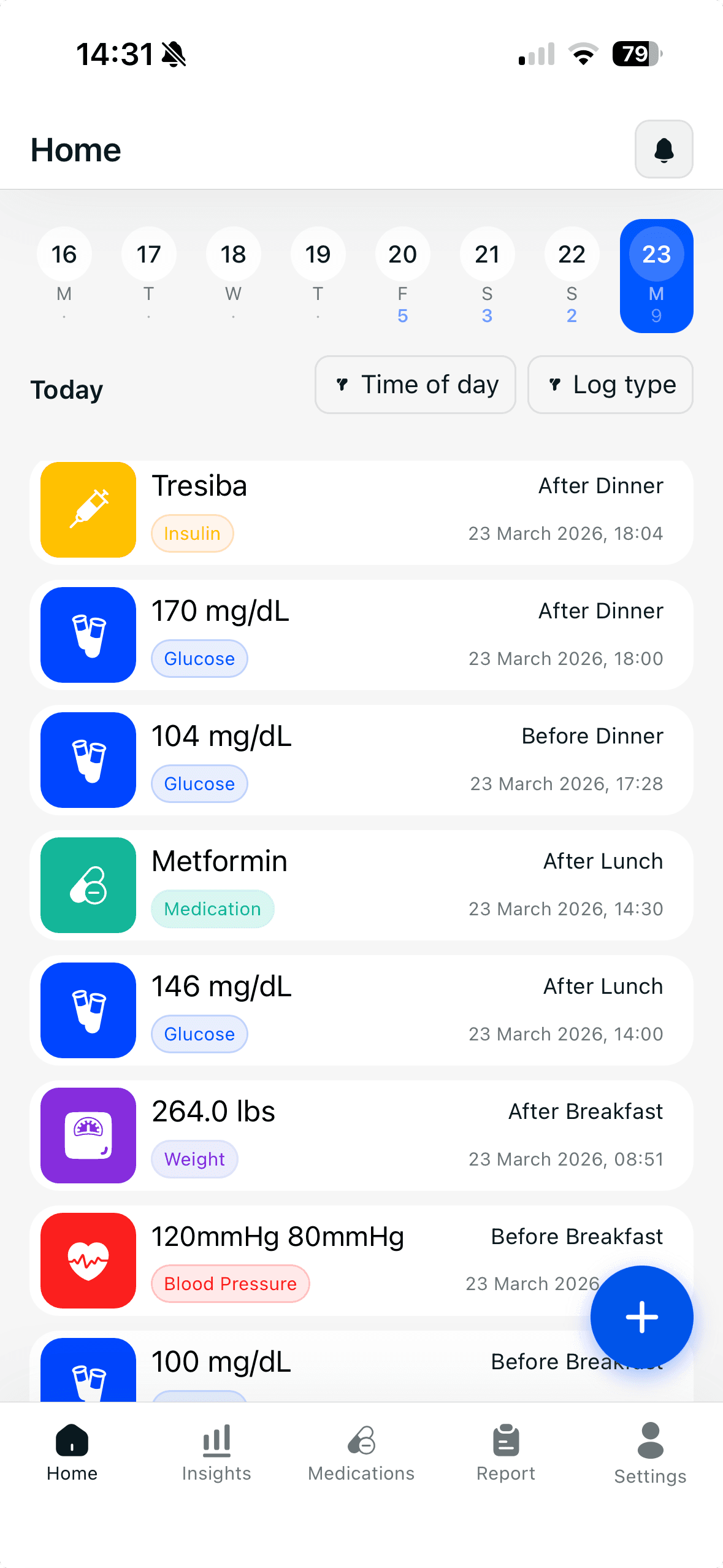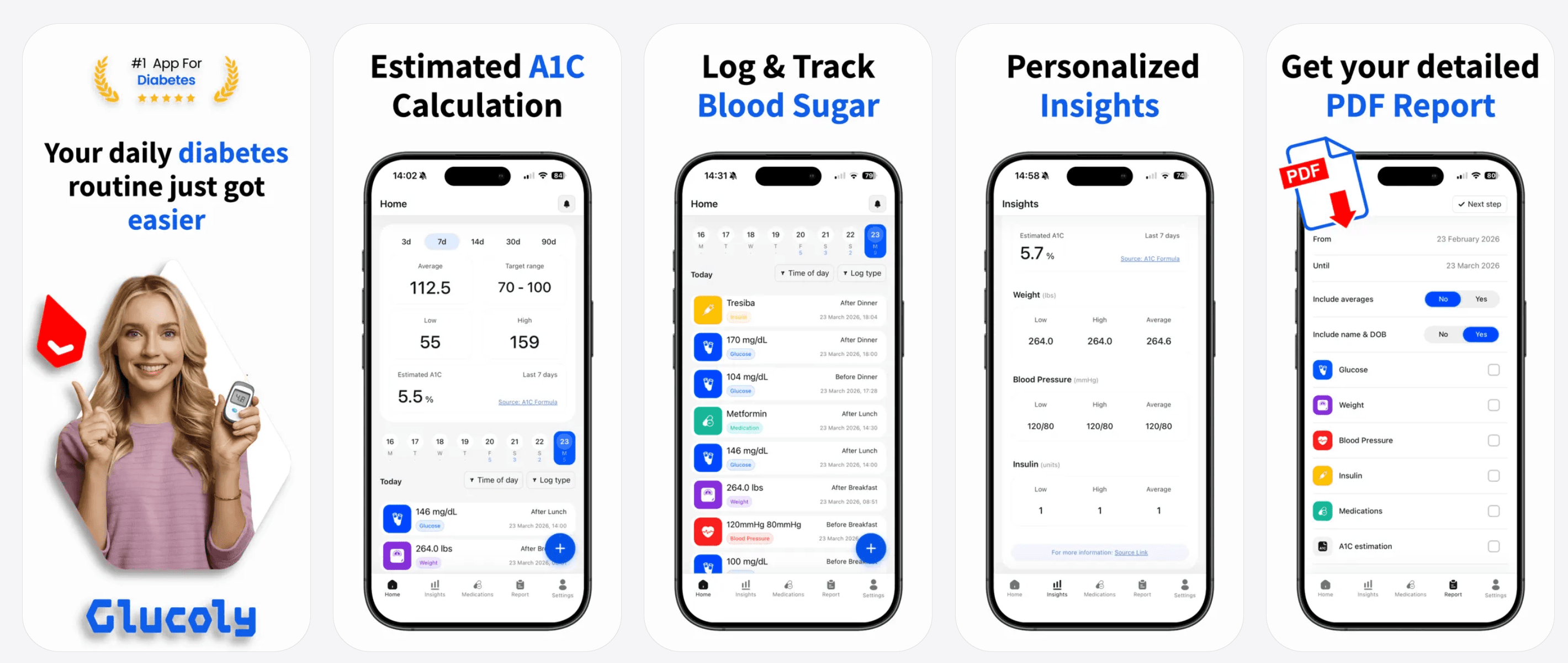
Phone cameras cannot measure blood glucose - but phone apps are the next best thing. Here's what glucose tracking apps like Glucoly can actually do for you.
No - a phone camera cannot measure your blood glucose. No consumer smartphone today has optical sensors capable of reading glucose in blood or tissue through the skin. If you searched 'check blood sugar with phone camera' hoping for a non-invasive shortcut, you're not alone - but that technology isn't available yet. What phone apps can do, however, is serve as the command center for all your glucose data: logging manual readings in seconds, pulling in continuous data from CGMs like Dexcom and Libre via Apple Health, and turning raw numbers into trends, estimated A1C, and doctor-ready reports.
In this article
- Why People Search for Phone-Camera Glucose Measurement
- What Phone Cameras Cannot Do
- What Phone Apps Can Do: Manual Logging and CGM Sync
- How Glucoly Works as Your Phone-Based Glucose Solution
- Features That Make Phone-Based Glucose Tracking Powerful
- Tips for Getting the Most from a Phone-Based Glucose Tracking App
- Can you measure blood sugar with an iPhone?
- What is the best blood sugar app for iPhone?
- Does Glucoly work with Dexcom or Libre?
- At a Glance: Phone cameras cannot measure blood glucose - no optical glucose sensing exists for consumers.
- Phone apps like Glucoly are the next best thing: log manual readings instantly, sync CGM data from Apple Health.
- Dexcom and Libre CGM data flows into Glucoly automatically via Apple Health - no manual entry needed.
- Trend windows of 3, 7, 14, 30, and 90 days turn individual readings into a picture of your control.
- Estimated A1C updates daily from your logged readings.
- Before/after meal tagging and PDF export make every appointment more productive.
Why People Search for Phone-Camera Glucose Measurement
The appeal is obvious: a truly non-invasive way to check blood sugar - no finger pricks, no sensor, no prescription - would be transformative for the hundreds of millions of people with diabetes worldwide. Researchers have been working on optical glucose sensing for decades, using near-infrared spectroscopy and other light-based methods to detect glucose through skin tissue.
Progress is real, but consumer-ready, clinically accurate optical glucose sensing does not yet exist in any smartphone. Claims you may see in app stores about 'camera-based glucose readings' are not validated by the FDA or any equivalent regulatory body. The science is promising; the product is not here yet.
- Near-infrared spectroscopy can detect glucose molecules in tissue - but requires specialized hardware, not a standard phone camera.
- No regulatory body (FDA, CE, TGA) has approved a smartphone camera as a glucose measurement device.
- Apps claiming camera-based readings should be viewed with caution - they are not substitutes for clinically validated glucose measurement.
- The closest consumer-level non-invasive option today is a CGM sensor worn on the arm or abdomen - not the phone itself.
What Phone Cameras Cannot Do
Standard smartphone cameras capture visible light reflected from a surface. They have no ability to penetrate skin tissue, detect glucose molecules in blood, or quantify any biological marker at a clinical level. Even with specialized apps, a phone camera cannot produce a reading in mg/dL or mmol/L that you can act on.
Some apps use your phone's flashlight and camera to measure pulse or estimate blood oxygen through photoplethysmography (PPG) - the same principle used by pulse oximeters. This is a real technique, but it does not measure glucose. Glucose and oxygen have entirely different chemical properties and require different detection methods.
- Standard cameras detect reflected visible light - not the chemical composition of blood or tissue.
- PPG-based apps measure pulse and SpO2, not glucose - different signals entirely.
- No algorithm can derive a glucose reading from camera data with clinical accuracy on current hardware.
- Always rely on a validated glucometer, CGM, or lab test for glucose readings you act on.
What Phone Apps Can Do: Manual Logging and CGM Sync
While the camera itself can't measure glucose, your phone is genuinely the best tool available for managing the data that comes from validated glucose measurements. A well-designed glucose tracking app turns your phone into a diabetes command center.
Manual logging is the foundation: type in a reading from your glucometer in a few seconds. More powerfully, if you use a Dexcom or Libre CGM, those sensors write glucose data to Apple Health automatically. Glucoly reads from Apple Health and pulls that data in continuously - meaning every CGM reading appears in Glucoly without you typing anything.
- Manual log: enter any glucometer reading in seconds - the app timestamps and stores it.
- Apple Health sync: Dexcom G6, G7, and Freestyle Libre 2/3 write to Apple Health; Glucoly reads it automatically.
- No manual entry needed for CGM data - once Apple Health sync is enabled, readings flow in around the clock.
- Both manual and CGM readings appear in the same timeline, giving you a complete picture regardless of which method you use.
How Glucoly Works as Your Phone-Based Glucose Solution
Glucoly is designed for people with Type 1 diabetes, Type 2 diabetes, prediabetes, and gestational diabetes who want their glucose data to be genuinely useful - not just stored. The app is built around three principles: capture every reading effortlessly, surface patterns you'd otherwise miss, and make that data portable for your healthcare team.
Once your readings are in - whether from manual entry or Apple Health CGM sync - Glucoly calculates a daily estimated A1C from your logs. The American Diabetes Association notes that an A1C below 7% is the goal for many adults with diabetes; seeing your estimated A1C update daily gives you a running sense of whether you're trending toward or away from that target.
- Log readings manually in seconds - the app timestamps each entry automatically.
- Apple Health sync pulls Dexcom and Libre CGM data into Glucoly with no manual effort.
- Estimated A1C calculates daily from your logged readings.
- Before/after meal tagging shows how specific meals affect your glucose in your personal data.
- Smart reminders prompt glucose checks, insulin doses, and medication times.
- Doctor-ready PDF export covers any date range you choose - no transcribing numbers by hand.
Features That Make Phone-Based Glucose Tracking Powerful
The real value of a phone-based glucose tracking app is pattern recognition. A single reading tells you where you are right now. Thirty days of readings - tagged before and after meals, overlaid with your A1C trend - tells you whether your management approach is actually working.
- Trend windows: 3, 7, 14, 30, and 90-day views reveal patterns that individual readings hide.
- Before/after meal tagging: see which meals spike your glucose and which keep it steady.
- Estimated A1C: updated daily so you always know where you stand between lab visits.
- PDF export: share a complete, time-stamped glucose log with your endocrinologist or diabetes care team.
- CGM integration via Apple Health: Dexcom and Libre data arrives automatically - ideal for overnight and between-meal tracking.
- 100,000+ users with a 4.8 App Store rating - a glucose-tracking workflow people actually use.
Tips for Getting the Most from a Phone-Based Glucose Tracking App
The quality of your insights depends on the consistency of your data. Here are the habits that make phone-based glucose tracking genuinely useful:
- Check and log at consistent times: fasting every morning, and before/after meals - consistent timing makes trends meaningful.
- Enable Apple Health sync immediately if you use a Dexcom or Libre CGM - let the automation do the work.
- Tag every reading as before-meal or after-meal so your meal data is organized and searchable.
- Use the 14-day and 30-day trend views weekly to spot patterns emerging before your next appointment.
- Set smart reminders for glucose checks, insulin doses, and medications - the app prompts you so you don't have to remember.
- Export a PDF before every healthcare appointment - your provider needs the full picture, not just today's number.
- Consult your healthcare provider before making changes to your treatment plan based on your logged data.
This article is for general education and is not medical advice. Consult your healthcare provider before making changes to your treatment plan.
Frequently Asked Questions
Can you measure blood sugar with an iPhone?
- An iPhone cannot directly measure blood glucose - no iPhone model has the hardware to sense glucose in blood or tissue.
- What an iPhone can do is serve as the hub for your glucose data: log manual readings from any glucometer, and receive CGM data from Dexcom or Libre sensors via Apple Health.
- Apple has acknowledged interest in glucose monitoring features, but no Apple Watch or iPhone to date has a clinically validated built-in glucose sensor.
- Until optical or other non-invasive glucose sensing is validated and approved, always use a glucometer or CGM for readings you act on.
What is the best blood sugar app for iPhone?
- The best app is one that fits your workflow: easy manual logging, Apple Health sync for CGM data, trend visualization across multiple time windows, and a clean export for your care team.
- Glucoly covers all of these: manual logging, Dexcom and Libre data via Apple Health, estimated A1C, 3/7/14/30/90-day trends, meal tagging, and a doctor-ready PDF export.
- Look for an app with a 4+ App Store rating and active updates - glucose tracking requires reliability.
- Over 100,000 people use Glucoly, with a 4.8-star App Store rating.
Does Glucoly work with Dexcom or Libre?
- Yes - Glucoly syncs with both Dexcom and Freestyle Libre CGM systems via Apple Health.
- Dexcom G6, G7, and Libre 2 and 3 write glucose readings to Apple Health automatically when their respective apps are installed.
- Glucoly reads from Apple Health and imports that data continuously - every CGM reading appears in Glucoly without manual entry.
- Once Apple Health sync is enabled in Glucoly settings, the connection is automatic and ongoing.
Sources
- American Diabetes Association. Standards of Medical Care in Diabetes 2024. diabetes.org
Your phone can't measure glucose - but Glucoly turns every reading into a trend, an estimated A1C, and a doctor-ready report. Free on the App Store and Google Play.
Download GlucolyShare this article
Related Posts
4 Free Diabetes Calculators to Bookmark in 2026
Blood sugar converter, A1C calculator, insulin correction factor, and carb counter — free online tools for dia…
Read more →diabetesBest Diabetes Tracking Apps of 2026 (Reviewed & Ranked)
The top diabetes tracking apps of 2026 compared — Glucoly, mySugr, Dario, Glucose Buddy, and One Drop ranked b…
Read more →diabetesGlucoly vs Dario: Diabetes App Comparison 2026
Glucoly vs Dario: compare a free multi-metric diabetes app to a connected glucometer platform. Find out which…
Read more →